
Solar Panels Layout: Placement, Obstacles, and Visualization
With Polysun SPT, getting started with the creation of a solar panels layout for the planning of the PV system is particularly intuitive and efficient—thanks to practical tools that digitally map the entire process from module placement and the consideration of interference objects to optimal roof utilization.
Create Solar Panels Layout: Reposition modules and interference objects
In the ‘Position’ tab, you have the option of repositioning modules and drawing in interference objects and surfaces. You will also receive a 3D visualisation of your building here. If you would like to output a screenshot of your project in the project report, you can click on “Take a screenshot” in the “Position” tab and this screenshot will then be output in the project report.
If you have already recorded the interference areas in the “Roof” tab, you can still move the interference areas here in the “Position” tab. With the “Measurement” tool, you also have the option of checking any dimensions, for example between a dormer and the edge of the roof.
You can use the “Selection tool” to edit several modules within a plotted area.
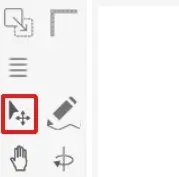
If you want to lay out several modules on a certain area at the same time, you can go to the module tool and select the second function.
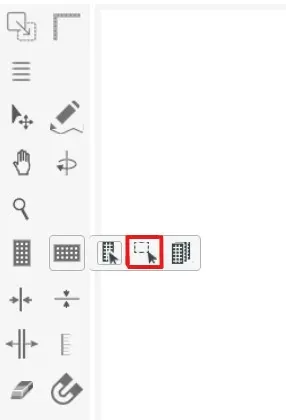
The ‘Activate/deactivate docking’ function allows you to dock the modules when moving them into the row of other modules or to place the modules anywhere on the roof surface if the function is deactivated.
Double-click on the other roof surface to select it and realign it in the view.
Draw in a dormer roof
The easiest way to draw dormers is directly in the “Position” tab.
To do this, select the “Draw” tool and draw a rectangle directly on the roof surface. This opens the menu directly and you can continue editing the interfering area.
In the menu, change the type of interfering area to “Dormer”. This will give you a direct preview of what the dormer will look like.
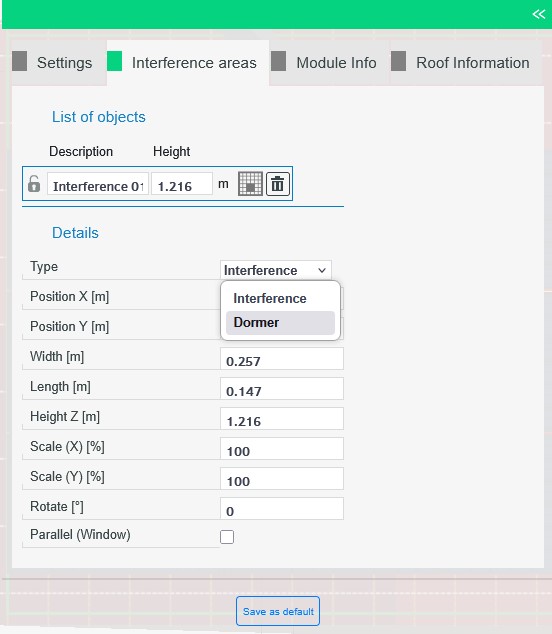
You can now change the dormer directly using the coordinate system or by entering dimensions in the menu. Click on a free space in the window to confirm the entry.
What are the key elements to consider when planning an optimal solar panel layout?
The planning process involves three main elements: module placement to maximize energy generation, identifying and accounting for interference objects (like dormers or vents), and using 3D visualization to accurately map the system onto the building structure and ensure optimal roof utilization.
How are obstacles like dormers incorporated into the final PV layout?
Obstacles must be accurately drawn or mapped onto the roof surface. This typically involves using a drawing or modeling tool to define the area of the obstruction, such as a dormer roof, and then confirming its dimensions. This ensures that no modules are placed in that shaded or unusable space, leading to a more efficient solar panel layout.
Is it possible to check and confirm all necessary dimensions during the layout process?
Yes. An essential part of finalizing the layout is having the ability to check and confirm all critical dimensions. This allows planners to measure distances, for example, between the edge of the roof and any obstacles, to ensure regulatory compliance and adequate space for mounting structures.