
Solar Panel Wiring Diagram PDF & Installation
When planning a photovoltaic system, the solar panel wiring diagram plays a crucial role in ensuring functionality, efficiency, and safety. In the Electrical tab of Polysun SPT, wiring diagrams can be created either manually or automatically, with options for horizontal or vertical string configuration. Each roof surface can be designed separately, giving you full flexibility during system planning.
Polysun SPT also allows you to export your solar panel wiring diagram as a PDF, providing clear and compliant documentation. The only requirement is that the system design must first be completed in the E-Designer and the string configuration finalized.
With this feature, Polysun SPT ensures that your PV system is documented with a professional solar panels wiring diagram installation, which is essential not only for system design but also for maintenance and long-term operation.
How to create a Panel Wiring Diagram as PDF?
In the “Electric” tab, you have the option of carrying out the stringing manually or automatically. For automatic stringing, click on “Horizontal” or “Vertical”. Depending on your selection, the modules are connected either horizontally or vertically. Carry out this step for each roof area. To switch to a different roof area, double-click on it.
You then can export the wiring diagram as a PDF.
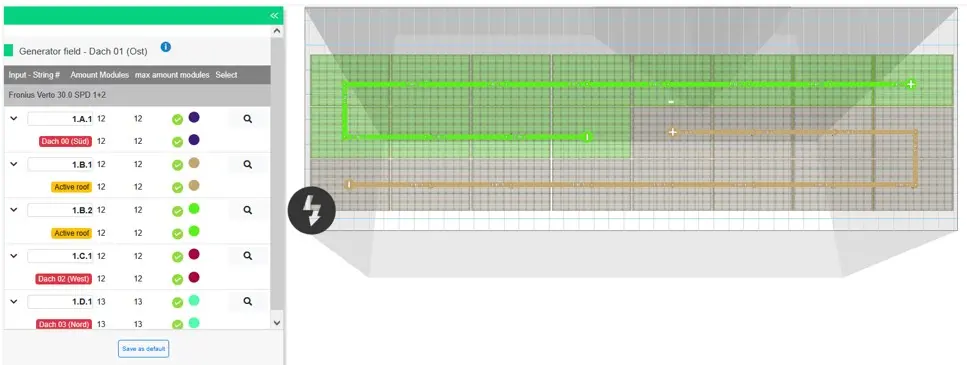
You also have the option of making settings for the panel wiring diagram in the “Electric” tab. The prerequisite for this is that you have previously created a plan in the E-Designer, simulated it and carried out the stringing.
If the number of modules to be stringed in the “Electric” tab does not match the number in the “E-Designer” tab.
If the number of modules in the “Electric” tab no longer corresponds to the number of modules in the planning (“E-Designer” tab), this is due to a change made to the inverter. To obtain the current number of modules, please click on “Reset”. The current inverter will then be automatically selected, and the number of modules will be updated accordingly.

How can I create a Solar Panel Wiring Diagram as a PDF in Polysun SPT?
In the Electric tab you can configure the strings manually or automatically (horizontal/vertical). Once completed, the wiring diagram can be exported directly as a PDF. The prerequisite is that the system has been planned and simulated beforehand in the E-Designer.
What should I do if the module number in the Electric tab does not match the one in the E-Designer?
This usually happens after changing the inverter. Click Reset so that the module number updates and the current inverter is applied.
Can I plan multiple roof surfaces separately?
Yes, each roof surface can be equipped with its own string configuration. By double-clicking on the respective roof surface you can switch between them.
Why is a Solar Panels Wiring Diagram Installation important?
A correct wiring diagram is essential for efficiency, safety, and long-term operation. It also serves as the foundation for installation, documentation, and future maintenance.
Does Polysun support automatic string planning?
Yes, with the Horizontal or Vertical options, strings can be connected automatically, which speeds up the planning process significantly.