
Guide for IT administrators
What will change?
Starting March 9 at 12:01 a.m., access to Polysun will be via a user-based licensing system. This means that from this date onwards, logging in with an email address and password will be the primary login option in the Polysun desktop app from version 2026.3 onwards. Ideally, the preparatory work should be carried out in the week of March 2, 2026. The replacement is secured by a legacy mode in which it is possible to switch back to the previous licensing system for a few weeks in the event of errors. However, we recommend that you start using the new user-based licensing system immediately.
The following options are now available to users with administrator rights in the user portal:
- Bulk invitation of users to the company account with an invitation link
- License assignment and management
- User management and rights assignment per user
- Users will be able to download updates directly from the portal
- Central user and license management for administrators
Advantages of replacement for IT
- No device key management
- No more network license manager service needed
- No manual distribution of license codes
- Independent updates by users
- Centralized management of all users and licenses for administrators
How will the device-based license be replaced?
Users with administrator rights should test access to the new user portal during the week of March 2. If the new user portal is not accessible in the company network environment, the web services listed below should be available for use. As soon as the portal is accessible, users can be informed and invited to the Polysun company account via an invitation link. Starting March 9, users will see the login window when they start Polysun version 2026.3 or higher.
Preparatory work for administrators
Starting March 2, 2026, administrators of Polysun network licenses and companies with multiple team members can carry out the above preparatory work. The portal will then be accessible and the license data will be migrated to your company account. On March 2, we will send detailed information to your key contact. They can register in the portal and add the IT admin.
If the key contact does not have access to the portal from the internal network, they will contact you. The situations listed in the following section should help you find a solution.
Behavior of the Polysun Desktop App in typical user situations
The Polysun Desktop App uses the web services necessary for operation to ensure that it is always up to date and to enable license access. These are summarized below:
- Access to velasolaris.com to call up the help documents in the app and contact support chat
- Access to location weather data and map information for selecting the location
- Access to the user portal for logging into the app
These web services may not be available or may only be partially available for the Polysun Desktop App in your company network. Network access may also be interrupted due to operational disruptions or other problems. The most common problematic user situations are listed below:
The user portal, help portal, or weather data cannot be accessed from the company network
Ensure that the following hosts and IP addresses are accessible
| Host | IP address | Port |
| Vela Solaris services | ||
| velasolaris.prod.sentinelcloud.com | 34.36.140.227 | HTTP port 80 & HTTPS port 443 |
| velasolaris.com | 195.65.111.112 | HTTP port 80 & HTTPS port 443 |
| ftp.velasolaris.com | 94.126.21.42 | FTP port 21 |
| backstore.velasolaris.com | 46.51.193.237 | HTTP port 80 & HTTPS port 443 |
| Polysun user based license | ||
| license.polysun.app | 52.48.205.137 | HTTPS port 443 |
| api.portal.polysun.app | 34.248.206.95 | HTTPS port 443 |
| portal.polysun.app | 3.248.41.103 | HTTP port 80 & HTTPS port 443 |
| alert-friendship-14.authkit.app | 172.64.152.23, 104.18.35.233 | HTTP port 80 & HTTPS port 443 |
| Third party services | ||
| ba-ws.geonames.net | 88.198.40.75 | HTTP port 80 |
| ba-ws2.geonames.net | 188.40.55.18 | HTTP port 80 |
| openstreetmap.org | 104.21.88.66, 172.67.173.161 | HTTPS port 443 |
| tile.openstreetmap.org | 199.232.189.91 | HTTPS port 443 |
| mdx.meteotest.ch | 34.95.90.60 | HTTPS port 443 |
User has not entered their proxy IP, proxy port, proxy user, proxy password

Users must enter their company’s proxy information once in the Polysun desktop app. You can find out how to do this here.
User has no network or unstable internet access
Information on how the Polysun desktop app behaves when there is no network access or an unstable internet connection (e.g., when traveling by train) can be found here.
After registering in the user portal, the user cannot see their company information and team members
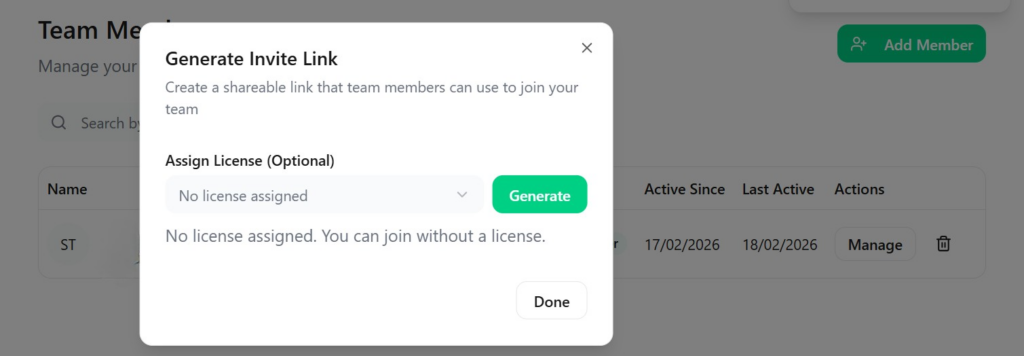
The user did not register via the invitation link to the company account, but registered as an individual user in the portal. The user therefore cannot see any valid licenses. As soon as they log in with a valid invitation link to the company account, they will be assigned to it. A user with administrator rights can generate such an invitation link in the portal.
Fallback – legacy mode
Existing customers can continue to use the previous legacy license mode during the transition period if:
- Network restrictions have not yet been adjusted
- The replacement cannot be completed in the short term
If you have any technical questions or special cases, please contact Polysun Support.
The legacy mode with the old licensing system can be accessed at any time as shown below by clicking on “Use old license”:
