
Heating Demand Estimation Analogue to Heating Degree Days
For engineers and planners, determining heating demand is essential for designing and optimizing energy-efficient heating systems. This article explains how to use Polysun to simulate heating demand using the degree-hour model. This model is based on the principles outlined in the book Solar Engineering of Thermal Processes, 3rd Edition, by John A. Duffie and William A. Beckman (2006, Hoboken, New Jersey, John Wiley & Sons Inc.).
Entering Energy Demand
The degree-hour model calculates the thermal energy required to maintain the desired room temperature for each hour of the year, also known as heat load. To calculate the hourly heating energy demand of a building, the degree-hour model requires information about the building. This information can be entered in four different ways, depending on the project’s available data. Please note that accuracy varies based on this choice.
Should the energy demand be defined based on the building’s physical parameters, such as U-values, please refer to the Dynamic Model.
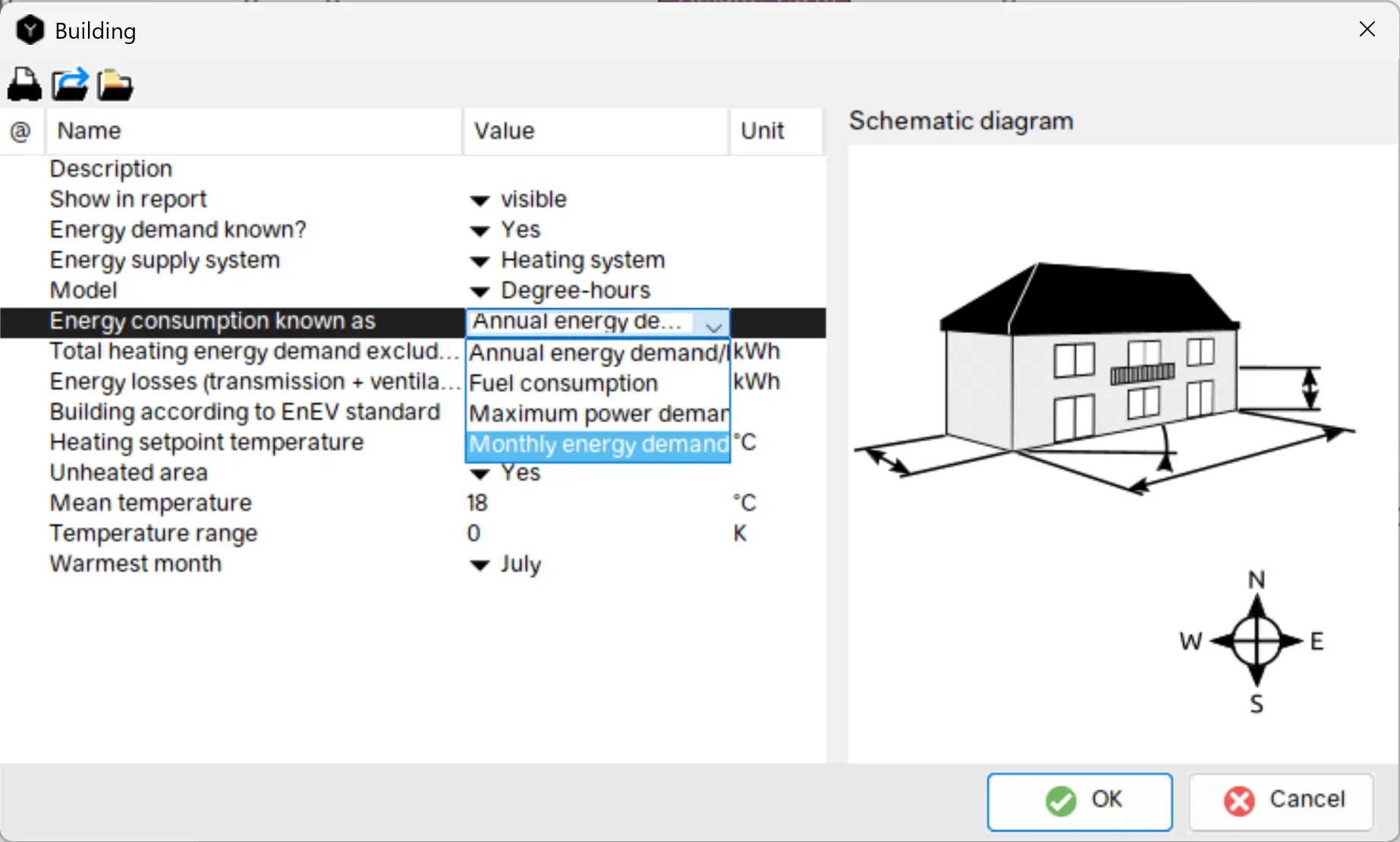
Anual energy demand/loss
The annual heating demand is specified in kWh. This model is suitable, for example, if the annual heating demand is known or has been calculated in some other way.
Monthly energy demand/losses
As before, an energy quantity in kWh can be specified in this model. The entry must be made separately for each month. This approach is particularly suitable for buildings whose heating demand deviates from the classic seasonal distribution.
Fuel consumption
In this model, the annual heat demand is defined based on the consumption of an energy source. This option should only be selected if no other information about the building is available. For existing buildings in particular, an initial estimate can be made based on available heating bills, for example. It is important to note that this method takes hardly any information about the building envelope into account. In Polysun, it is possible to choose between five different energy sources, using the standard billing units for each.
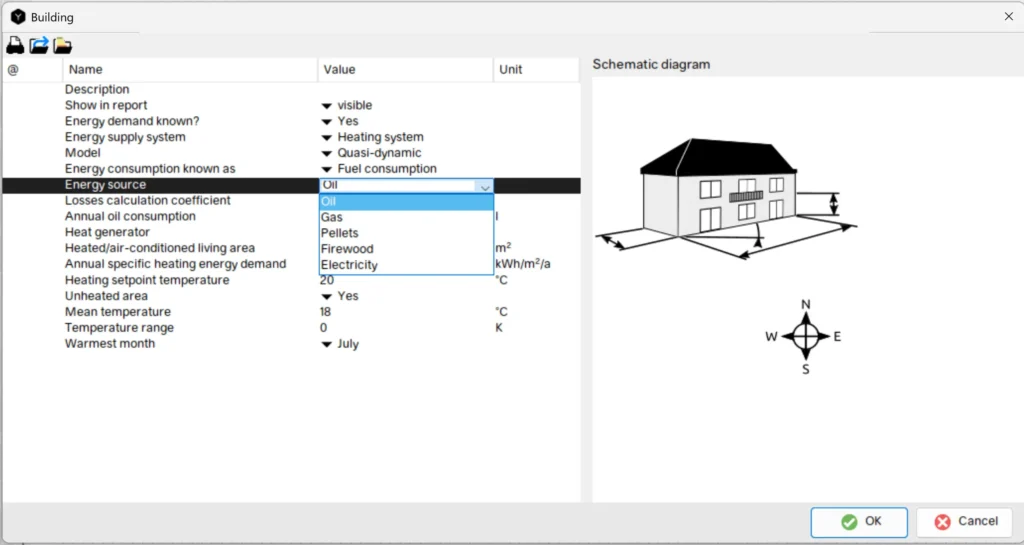
After selecting an energy source, the annual consumption is specified to define the building’s total energy demand. Additionally, the type of heat generator has to be chosen, as either “new” or “old”. This selection influences the calculation of the effective heat demand. For example, the heat demand for gas is calculated using the following formula, where 37,800 is a conversion factor in kJ/m³:
\(Q_{dem,heating} = \frac{37800}{3600} * Fuel_{consumption}*\eta_{fuel}\)
For new heat generators, a conversion factor of \(\eta_{fuel} = 0.85\) is used, while for old heat generators (about 20 years or older), \(\eta_{fuel} = 0.6\) applies.
It should be noted that the efficiency, that is estimated here, is only used in order to derive an approximate heating demand. The component (eg., heat pump or boiler) used in the simulation for heat generation may have a different efficiency. This value can be found in the component itself.
Additionally, heat losses are calculated using the losses calculation coefficient \(c_{loss}\), which is set to 3 by default. Depending on the insulation or internal heat gains, the value can be adjusted individually:
\(Q_{loss} = Q_{dem,heating} *c_{loss}\)
Maximum energy demand
When selecting the maximum power demand, one of two methods must be chosen. The method can be determined either by the minimum outside temperature or by the full load hours. Depending on the chosen method, a maximum power demand must be entered along with the full load hours or the outside temperature to define the heating demand.
Minimum Ambient Temperature:
The maximum power requirement (\(Q_{dem,max}\)) is defined by the user and specified for the lowest outdoor temperature (\(T_{amb,min}\)) at the respective location. For each hour, the actual heat losses are then calculated in proportion to the current temperature difference between the target room temperature (\(T_{set} \)) and the respective outside temperature (\(T_{amb}[h]\)).
The heat losses from the maximum energy demand are calculated as follows:
\(Q_{loss}[h] = \frac{Q_{dem,max}}{T_{set}-T_{amb,min}}*\frac{(T_{set}-T_{amb}[h])}{1000}\)
The annual heat loss is the sum of all hourly heat losses that occur when the heating setpoint temperature is higher than the outside temperature.
\(Q_{loss} = \sum Q_{loss}[h]\)
The annual energy demand is then calculated using the user-defined loss calculation coefficient, which is set to 3 by default:
\(Q_{dem,heating} = \frac{Q_{loss}}{c_{loss}}\)
Full Load Hours:
For this variation the maximum energy demand and the full load hours must be entered. Based on these entries, the heating demand for the building is calculated using the following formula:
\(Q_{dem,heating} = \theta_{full} * Q_{dem,max}\)
where \(\theta_{full}\) represents full load hours and \(Q_{dem,max}\) is the user-defined maximum power demand.
The calculated heating demand is used in conjunction with the loss calculation coefficient to calculated the energy losses and gains:
\(Q_{loss} = Q_{dem,heating}*c_{loss}\)
The following example shows the component results. Within these results, detailed information about the heating energy demand can be found in annual and monthly values. In Polysun, the heating energy demand can be displayed in various ways and resolutions, for example in the Graphical Evaluation.
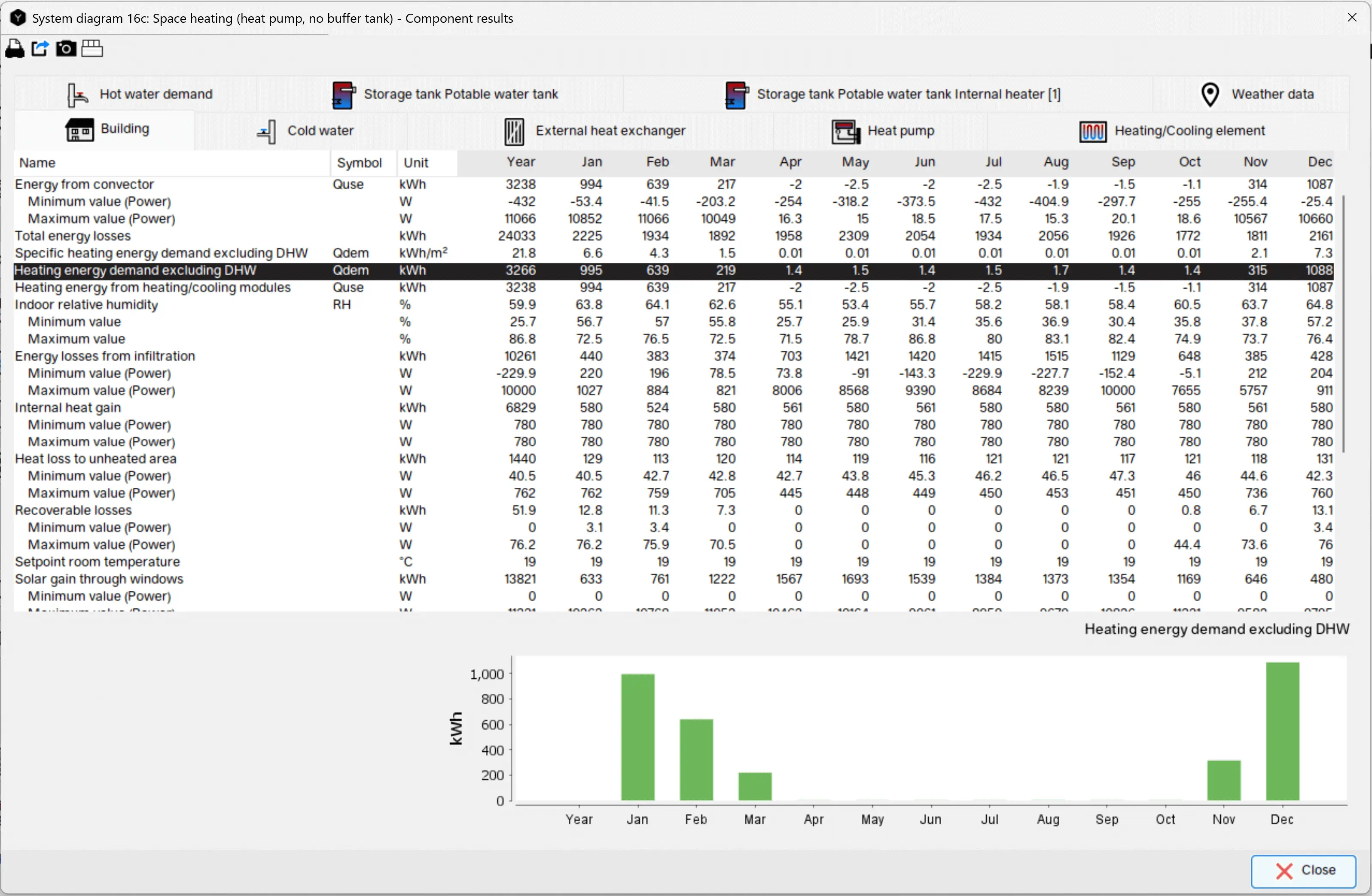
Understanding Heating Demand and Energy Losses
For all methods of specifying a building’s energy demands, the total heating energy demand excluding domestic hot water and the energy gains or losses can be directly entered in the building’s context menu or calculated based on the provided inputs, as outlined above.
Energy Losses (Transmission + Ventilation): Transmission losses occur when heat is transferred from a warmer to a colder body through solid structural elements such as exterior walls or window surfaces. In Polysun, these losses are calculated as follows:
- \(Q_{loss} = Q_{dem}\) + internal gains
where \(Q_{loss}\) represents energy losses (transmission + ventilation) and \(Q_{dem}\) is the heating demand. Energy losses (transmission + ventilation) account for all internal gains, such as solar gains through windows, heat emitted by appliances, and occupants. Polysun defines these losses as the total annual heat losses. This value already contains the annual heating demand. A ratio of 1:1 between heating demand and losses implies no internal gains — an assumption that is rarely accurate. Therefore, the tooltip indicates that energy losses should ideally be two to eight times greater than the heating demand.
Degree-hour model: Analogous to the calculation of heating degree days
The degree-hour model in Polysun uses heating degree days as a foundation to create a temperature difference profile (vector). This vector records the hourly differences between the desired room temperature and the current outdoor temperature. When the outdoor temperature exceeding the desired room temperature, Polysun automatically reduces the heating demand to zero, since no heating is required during these hours:
- \(T_{diff}[h] = T_{set}-T_{amb}[h]\)
The total sum of all temperature differences is then determined from the previously calculated hourly differences. This sum reflects both the duration and the extent to which the outdoor temperature was below the desired room temperature. It forms the basis for further heating demand calculations:
- \(Sum_{T_{diff}} = \sum T_{diff}[h]\)
For each hour in which the outdoor temperature is below the room setpoint temperature, the corresponding temperature differences are added together.
- \(N_{hours,losses}\)
After determining the total temperature difference based on heating degree days, the UA value (overall heat transfer coefficient) of the building is calculated, taking energy losses into account. The conversion from kilowatt-hours to watt-hours is done using a factor of 1,000:
- \(UA_b = \frac{Q_{loss} * 1000} {Sum_{T_{diff}}}\)
Calculating Base Temperature
The base temperature is the temperature at which the building is in thermal equilibrium. If the outside temperature drops below the base temperature, the building requires heating to maintain the desired room temperature.
To determine the base temperature, the annual energy gains (\(Q_{gains}\)) are calculated first. These gains are the difference between energy losses (\(Q_{loss}\)) and heating demand (\(Q_{dem,heating}\)):
- \(Q_{gains} = Q_{loss} – Q_{dem,heating}\)
To calculate the base temperature, Polysun considers not only the energy gains and losses but also the total sum of temperature differences between the setpoint and outdoor temperature (\(Sum_{T_{diff}}\)) and the number of hours (\(N_{hours,losses}\)) during which heating is required. The base temperature is then calculated as:
- \(T_{bal} = T_{set} – \frac {Q_{gains}}{Q_{loss}}*\frac{Sum_{T_{diff}}}{N_{hours,losses}}\)
Hourly Calculation
In the next step, Polysun calculates the difference between the base temperature and the actual outdoor temperature (\(T_{amb}[h]\)) for each hour of the year, provided the outdoor temperature is below the base temperature. This results in the degree-hour vector:
- \(DH[h] = T_{bal} – T_{amb}[h]\)
All positive values of this vector are summed up over the year to determine the total number of degree hours:
- \(Sum_{DH} = \sum DH[h]\)
The annual heating demand is then proportionally distributed across the individual degree hours to obtain the hourly heating demand:
- \(Q_{dem}[h] = Q_{dem,heating}*\frac{DH[h]}{Sum_{DH}}\)
At the same time, hourly energy losses are calculated by relating the hourly temperature difference (\(T_{diff}[h] = T_{set} – T_{amb}[h]\)) to the annual sum of all temperature differences:
- \(Q_{loss}[h] = Q_{loss}*\frac{T_{diff}[h]}{Sum_{T_{diff}}}\)
Hourly energy gains are then calculated as the difference between hourly losses and hourly heating demand:
- \(Q_{gains}[h] = Q_{loss}[h]-Q_{dem}[h]\)
Finally, the hourly building temperature is determined by relating the hourly heating demand to the maximum hourly demand and subtracting it from the setpoint temperature:
- \(T_b[h] = T_{set}[h] – \frac{Q_{dem}[h]}{max(Q_{dem}[h])}\)
Energy Deficit
The energy deficit (\(Q_{def}\)) is the difference between the calculated heating demand of a building and the actual heating provided by the heating system. In the context of Polysun, the energy deficit is calculated as the difference between the heating demand (\(Q_{dem,heating}\)) and the output delivered by the convector (\(Q_{conv}\)):
- \(Q_{def} = Q_{dem,heating} – Q_{conv}\)
During the simulation, Polysun checks whether the energy demand based on degree days is fully met. If not, it issues a warning when one of the following scenarios occurs:
- The energy deficit exceeds 50% of the energy demand for a total of 12 hours within at least 10 consecutive time points.
- Or the energy deficit exceeds 30% of the energy demand for a total of 24 hours within at least 5 consecutive time points.
Can I use Polysun to size heat pumps and other heating systems?
Yes, Polysun provides professional tools for simulating and sizing thermal energy systems, enabling optimal design of heating and cooling systems, such as heat pumps, based on a building’s specific requirements.
Can I view heating demand in different time resolutions in Polysun?
Yes, Polysun enables the display of heating demand results in multiple time resolutions, such as hourly and monthly intervals.
Can Polysun handle multi-energy source systems?
Yes, Polysun is designed to simulate and optimize complex energy systems integrating multiple sources. Technologies such as heat pumps, photovoltaics, solar thermal, batteries, cogeneration units, geothermal probes, pellet boilers, and others can be configured and combined within a single project. Polysun provides numerous templates and supports customized design of energy systems, facilitating the planning, comparison, and optimization of holistic and hybrid energy solutions for buildings and districts. This functionality enables modeling of integrated systems for electricity, heating, cooling, and domestic hot water, ensuring reliable and energy-efficient performance.